Driving & Car Ownership in inZOI: A Comprehensive Guide
Getting around the vibrant cities of Dowon and Bliss Bay is a key part of your Zois' daily lives in inZOI. While public transport like subways and buses exist, owning and driving a personal vehicle offers a customized mode of transport and a touch of style. This guide covers everything you need to know about acquiring, driving, and interacting with cars — and the motorcycles, scooters, boats, jet skis, and hovercrafts added since launch.
How to Get a Car
Purchasing a vehicle for your Zoi is done through their smartphone:
- Open Smartphone: Access the phone interface (
[P]key or UI icon). - Open Dream Car App: Tap the "Dream Car" app icon (usually an orange car symbol).
- Browse Vehicles: Explore the available car models. Currently, options include generic types like "Z-Car," "Sedan," "SUV," and potentially licensed models like the "Hyundai IONIQ 5" or "Hyundai AZERA".
- Select and Purchase: Click on the desired car. You can usually select a color during checkout. Confirm the purchase using your household's Meow funds.
- Delivery: The purchased car will typically appear parked near your Zoi's current residential lot shortly after purchase.
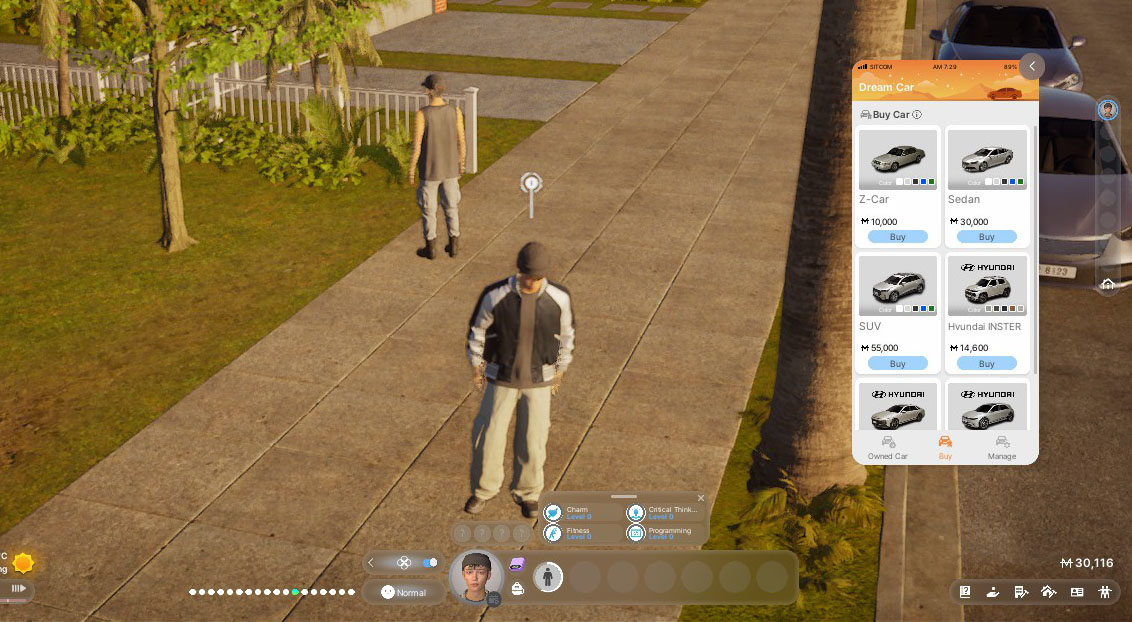 (Image: The Dream Car app interface showing available vehicles)
Driving Your Car: Manual vs. Automatic
inZOI offers two main ways to use cars for travel:
Manual Driving (Direct Control)
This allows you to personally pilot the vehicle around the city.
- Enable Setting: Manual driving might be disabled by default. To enable it, go to Options (
Esc) > Gameplay > Driving and toggle "Enable Manual Driving" to ON. - Enter Car: Click on the car and select "Get in Car (Driver's Seat)". Only the Zoi who owns the car (or potentially designated family members) can drive.
- Controls: Use the standard driving controls (see table below).
- Gameplay: Offers a more immersive experience. Allows you to explore freely but requires active control. Be aware that manual driving can lead to accidents if you collide with other vehicles or Zois.
Automatic Driving ("Drive Here" / Fast Travel)
This functions more like a directed fast travel option using the car.
- Initiate Travel: Open the City Map (
[M]). Select a destination lot or point on the map. Choose the "Drive Here" option (this appears if the active Zoi owns a car). - Process: Your Zoi will automatically walk to their car (it often summons nearby if not close), get in, and the game will simulate the drive, usually fading out and loading you near the destination much faster than manual driving would take.
- Benefit: Convenient for getting places quickly without needing to navigate traffic manually. Less risk of accidents initiated by your Zoi.
Driving Controls (Manual Mode for Cars)
| Input | Action | Notes |
|---|---|---|
[W] | Accelerate | |
[S] | Brake / Reverse | |
[A] / [D] | Steer Left / Right | |
[Left Mouse Click] (while driving) | Honk Horn | Confirmation needed if this persists in final build |
[Tab] | Switch Camera Perspective | Toggles between 3rd person (outside) & 1st person (inside) |
| Click Car/Interact (when stopped) | Get Out / Other Interactions |
A speedometer appears while driving, added in v0.4.0.
Car Interactions & Features (Beyond Driving)
Cars in inZOI aren't just for transport; they have several interactive elements:
- Get In/Out: Zois can enter specific seats (Driver, Passenger, Rear Seats).
- Open/Close Trunk: Interact with the front or rear trunk. (Functionality for storage TBD).
- Wash Car: Clean a dirty car to restore its appearance.
- Repair: Fix the car if it becomes damaged (likely after accidents, though damage mechanics are minimal).
- Take Selfie With Car: A social/hobby interaction that may boost Media Production skill.
- Roll Windows Up/Down: Individually control window positions.
- Toggle Lights: Turn headlights, emergency lights, and turn signals on/off.
Vehicle Types and Customization
The vehicle lineup has grown well past the standard cars available at Early Access launch.
- Motorcycles and electric scooters — added in v0.3.0 on August 20, 2025, alongside 14 new vehicles in total. Three new Hyundai models joined the lineup (Staria Lounge, IONIQ 9, All-New NEXO), and used cars became available at roughly half price.
- Jet skis and hovercrafts — added in v0.5.0 in December 2025.
- Boats exist in Cahaya, along with water taxis and seaplanes for travelling between cities.
- Colour: select the primary colour during purchase via the Dream Car app. Since v0.4.0, pressing the colour icon shows a live preview of the vehicle in that colour, and an age requirement message appears where relevant.
Important Limitations & Considerations
- Ownership: While purchased via the smartphone, car ownership seems tied to individual Zois. How household sharing works precisely is still being refined.
- Age Restriction: Children cannot drive. Driving is available from the Teenager stage onwards, and the game now shows an age requirement message at purchase.
- Accidents & Consequences: Manual driving allows for collisions.
- Minor Collisions: Often result in the drivers getting out, arguing briefly, and then continuing. Collision reactions were improved in v0.5.0.
- Hitting Zois: Colliding with pedestrian Zois can cause injury or death, and can lead to the driver being arrested. Note that traffic accident trials are not implemented — unlike other crimes, these Zois are sent straight to jail without a court process. The team has said this will be improved.
- Physics & Damage: Vehicle physics are simplified across the board, with a focus on feel over complex simulation.
- Getting Stuck: If a Zoi can't exit a vehicle, use the Emergency Rescue option in Psycat's Guide. Since v0.4.0, Emergency Rescue works while riding in boats and cars, not just on foot.
Conclusion
Vehicles in inZOI add realism, personalisation, and an alternative travel method. The driving mechanics remain relatively simple, but between cars, motorcycles, scooters, boats, jet skis, and hovercrafts there's now a real range to own and drive. Just remember to drive carefully if you choose manual control — the consequences of accidents can be significant, and there's no trial to argue your way out of one.
Update history
- August 20, 2025 (v0.3.0) — 14 new vehicles including motorcycles and electric scooters, three new Hyundai models, and used cars at roughly half price. Boats arrived with Cahaya.
- October 30, 2025 (v0.4.0) — colour preview when selecting a vehicle colour, an age requirement message, a speedometer while driving, and Emergency Rescue usable inside boats and cars.
- December 23, 2025 (v0.5.0) — jet skis and hovercrafts, and improved reactions to vehicular collisions.
- December 24, 2025 (v0.5.1) — fixed Zois emerging from underground at Water Taxi destinations.
- February 24, 2026 (v0.6.1) — fixed reflection intensity and surface texture on used vehicle wheels.